PDF tools
Merge, split, compress and protect PDFs
Combine the scans, the invoice and the cover letter into one file. Pull three pages out of a report. Shrink an attachment until email accepts it. Lock a document before you send it.

The PDF toolbox
- Merge PDFs — two or more files into one, in the order you drag them
- Split PDF — every N pages, each page separately, or the exact ranges you name
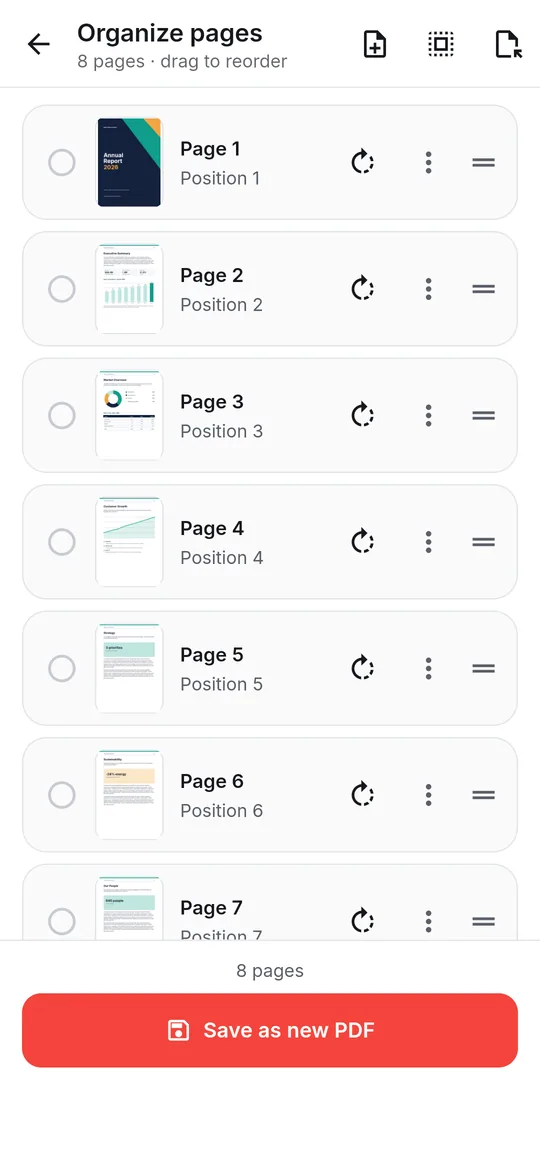
- Organize pages — reorder, rotate, duplicate, delete, insert blank pages or extract a selection
- Rotate PDF — every page or only the ones you choose, 90° either way or 180°
- Compress PDF — Smallest file, Balanced or Best quality
- Lock PDF — AES-256 password protection with optional permission limits
- Unlock PDF — save an open copy of a PDF you have the password for
Merge and split PDF files
Merge PDFs: add at least two documents, drag the rows into order and optionally name the output. Split PDF: choose Every N pages, Each page separately or Specific page ranges; the screen tells you how many files it will produce before you start.
Merge, split, organize and rotate keep each page as it was: text stays selectable and searchable, and links, bookmarks and form fields keep working.
Organize and rotate pages
Organize pages shows a thumbnail for every page. Drag to reorder, rotate left or right, duplicate, delete, insert a blank page, or select pages and extract them into a new PDF. Rotate PDF changes only the page orientation — text, links and form fields stay exactly as they were.
Compress a PDF
Compression re-encodes the photos and scans inside a document; text stays searchable and selectable, and links and form fields keep working. Smallest file (72 DPI) gives the biggest saving with softer images, Balanced (96 DPI) suits most sharing, and Best quality (144 DPI) keeps detail with smaller savings. The result shows the size before and after.
For scans that still won't shrink, Flatten to images turns every page into a picture — the smallest result, but text in that copy can no longer be searched or copied.
Lock and unlock PDFs
Lock PDF writes a password-protected copy using AES-256 (or AES-128 for PDF readers older than 2010). You can also choose whether the copy may be printed, have text copied, be edited or have forms filled in. Text, images, links and bookmarks are kept exactly — nothing is re-rendered. There is no way to recover a forgotten password, so store it safely.
Unlock PDF saves a copy without the password when you enter the correct one. It is for documents you are entitled to open, not a way around someone else's protection.
Step by step
How to merge PDF files
- Open Tools → Merge PDFs and add your files.
- Add at least two files, then drag the rows into the order the pages should follow.
- Optionally type an output name, then merge.
- Open or share the merged PDF from the result sheet.
Good to know
Before you start
-
Nothing re-rendered
Merge, split, organize and rotate keep each page as it was: text stays selectable and searchable, and links, bookmarks and form fields keep working.
-
About saving results
When some tools finish, the app may ask you to watch a short video before the new file is saved. If you are offline or no video is available, the file is saved anyway — and your original is never changed.
-
On your device
Every tool runs offline. Files and passwords are never uploaded.
Questions
PDF Tools FAQ
How do I merge PDF files on Android?
Open Tools → Merge PDFs, add two or more files, drag them into order and merge. The combined PDF is saved to your device.
Does compressing a PDF reduce quality?
Only the images are recompressed, at 72, 96 or 144 DPI depending on the level; text stays sharp and selectable. Choose Best quality to keep more image detail.
Can it remove a password I don't know?
No. Unlock PDF needs the correct password. It saves an open copy of a document you can already open.
Is locking a PDF lossless?
Yes. Lock PDF encrypts a copy without re-rendering it, so text stays selectable and links keep working.
Also in the app
More ways to work with PDFs
Get PDF Reader on Google Play
Reader, editor, scanner and converter in one free Android app. Android 8.1 or later. Supported by ads. No account needed.