Document scanner
Scan documents to PDF with your phone camera
Point the camera at a page and PDF Reader finds its edges for you, flattens an off-angle shot and cleans it up — then saves every page you capture as a single PDF.
What the PDF scanner does
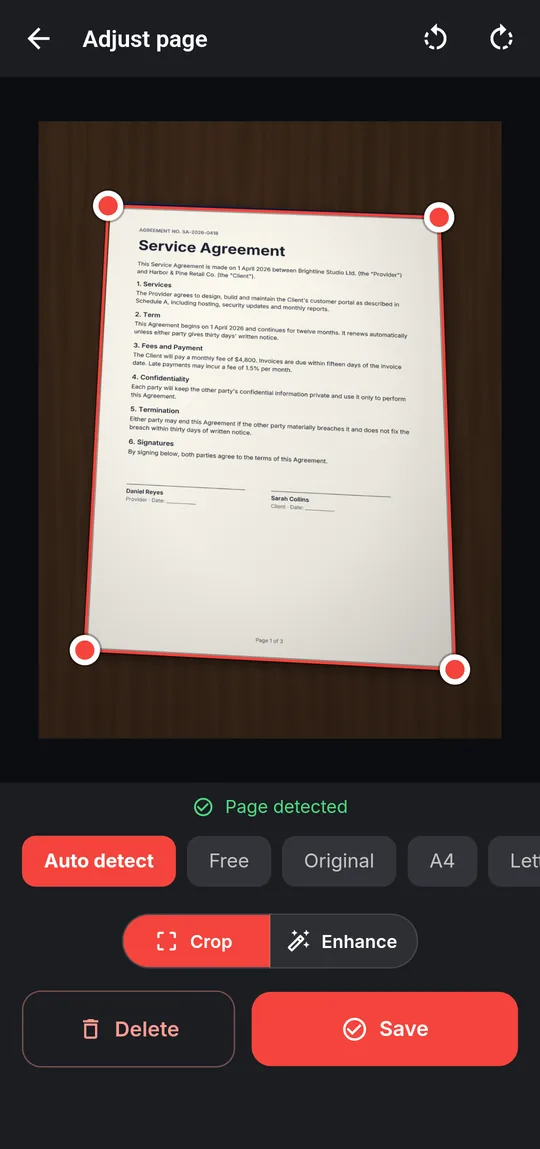
- Live page-edge detection in the camera view — Page detected
- Perspective correction that straightens pages shot at an angle
- Crop to Auto detect, Free, Original, A4, Letter or a Custom ratio
- Filters: Auto, Original, Color, Grayscale, Document and Black & white
- Multi-page scans: add, retake, rotate and drag pages into order
- Flash off, auto or on, and Import from gallery for photos you already took
Step by step
How to scan a document to PDF
- Open Tools → Scan to PDF and allow camera access.
- Hold the page inside the frame. When you see Page detected, capture it.
- Check the corners (drag them if needed) and pick a filter such as Document or Black & white.
- Add the next page. Drag thumbnails to reorder, or tap one to retake it.
- Tap Create PDF. Every page goes into one PDF, each sized to the page you scanned.
Good to know
Before you start
-
Good for everyday paper
A4 and Letter sheets, receipts, forms, ID cards and visiting cards.
-
Processed on the phone
Edge detection, correction and filters run on your device. The camera feed and photos are not uploaded.
-
Need the words?
A scan is a picture of text. Run Make searchable on it to search, select and copy the words, or PDF to text to extract them.
Questions
PDF Scanner FAQ
Does the scanner work offline?
Yes. Capturing, cropping, filtering and saving the PDF all happen on your device.
Can I scan several pages into one PDF?
Yes. Keep adding pages, reorder them by dragging, then save once — every page goes into the same PDF.
Can I make a scanned PDF searchable?
Yes. Open Tools → Make searchable and choose the scan. The app recognizes the text on the phone and adds it invisibly, so the pages look the same but can be searched and copied.
Also in the app
More ways to work with PDFs
Get PDF Reader on Google Play
Reader, editor, scanner and converter in one free Android app. Android 8.1 or later. Supported by ads. No account needed.