Happy Diwali

Celebrate Diwali with Elixir PDF

Celebrate the festival of lights with smarter document management.

Get it on Google Play

Diwali offers · from 3 November

Diwali offers on PDF Reader Premium

From 3 to 14 November, new subscribers in India can try Premium free for 7 days.

Get the app

Premium: no ads, no video before saving results.

Diwali offer · 3–14 November

Premium free for 7 days this Diwali

Start the weekly plan with a free week, or pay less for the first period of any other plan.

Explore Diwali Offers

New subscribers in India, until 14 Nov 2026. Then the regular price applies unless cancelled.

All your PDF tools

Everything You Need for PDFs

Read, merge, split, scan and convert documents with ease.

See all PDF tools

Scan and convert

Turn Paper into Digital Documents

Scan documents with your camera and save them as PDFs in seconds.

Explore the scanner

Your documents, simplified

Make PDF Tasks Easier

Discover convenient tools for managing your documents — offline, on your phone.

Explore features

Free PDF app for Android

Read, edit, sign, scan and convert PDFs — right on your phone

PDF Reader is a fast PDF viewer, editor, form filler, document scanner and offline converter in one app. Your documents are processed on your device and never uploaded to a server.

  • Works offline
  • No account or sign-up
  • 12 languages
  • Android 8.1 and later
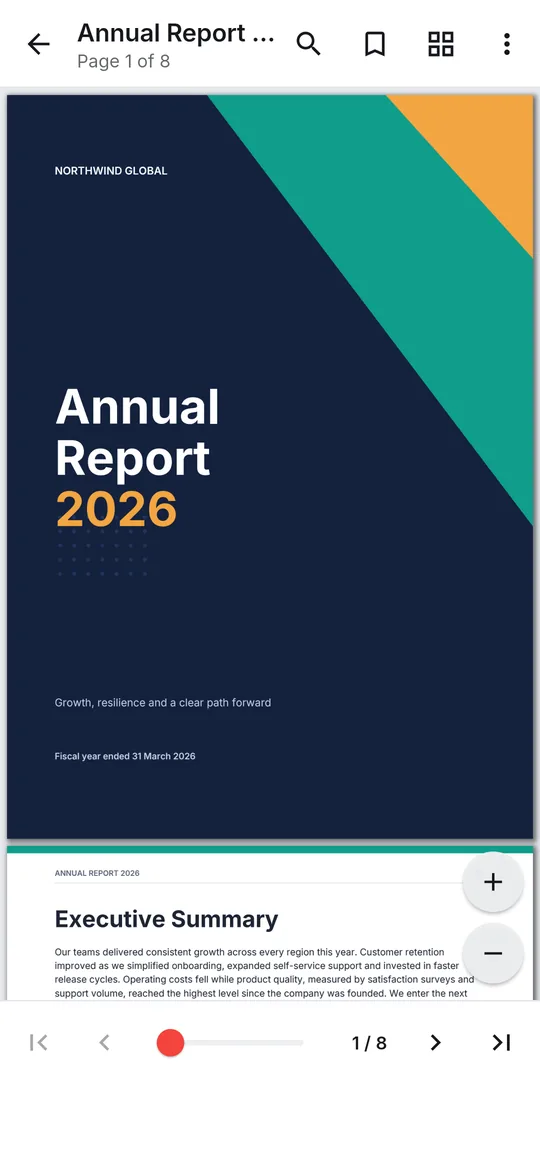
A PDF open in the reader with the page toolbar and zoom controls
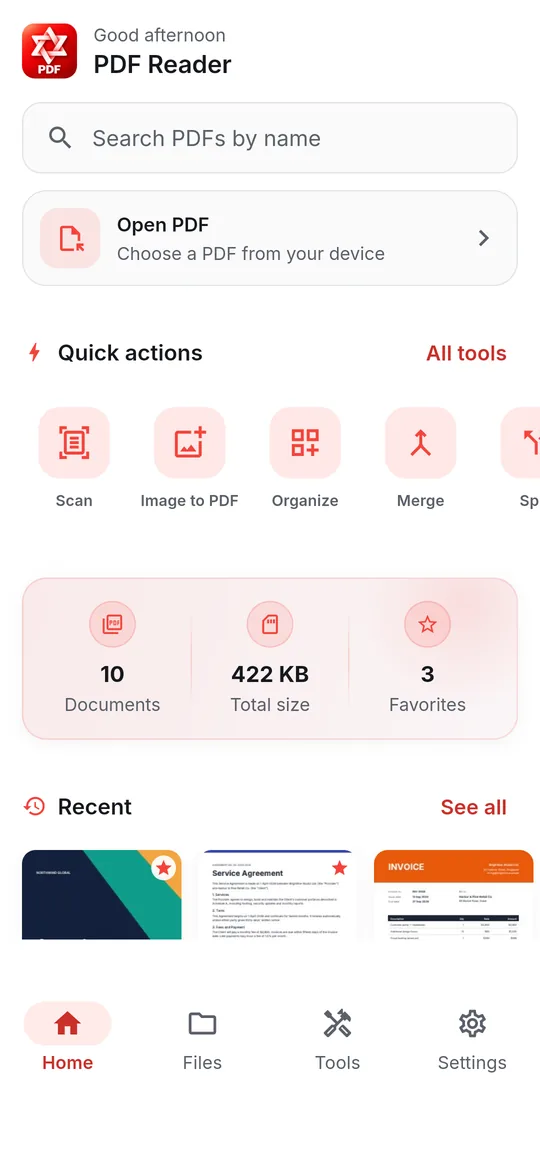
PDF Reader home screen with Quick actions for Scan, Image to PDF, Merge, Compress, Edit, Fill & sign, Word to PDF and PDF to Word, recent files and an Open PDF button
  • 16PDF tools in one app
  • 12interface languages
  • 0documents uploaded — tools run on the phone
  • AES-256password protection

Features

Built for the way you actually use PDFs

Read

Read PDFs with ease

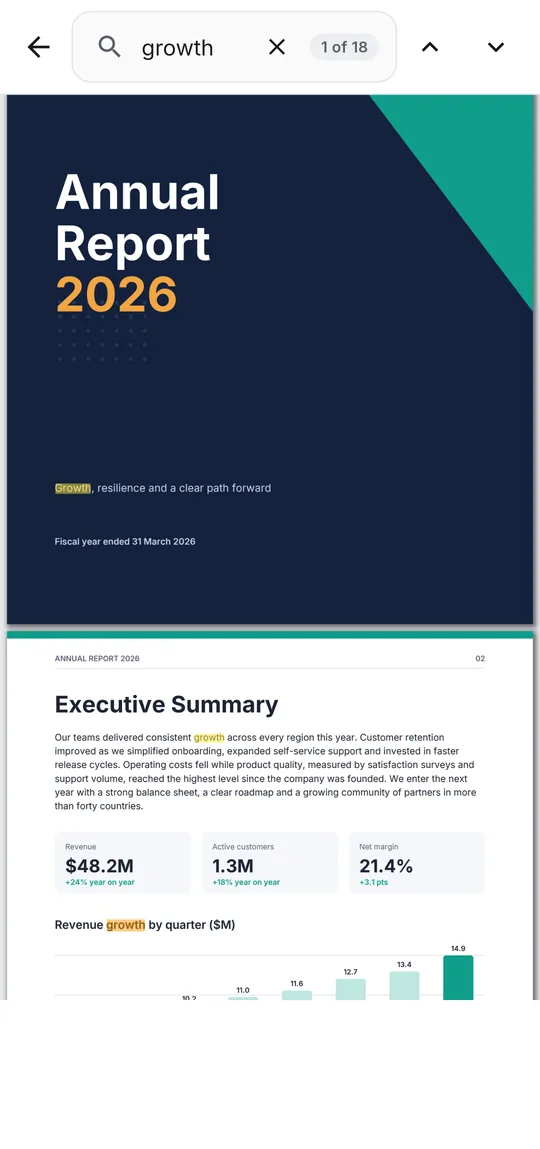
Open a contract, a textbook or a 300-page manual and start reading straight away. Find any word, jump through the contents and pick up where you left off.

  • Search in document and step through every match
  • Contents, page thumbnails, a page slider and Go to page
  • Bookmarks, and the reader reopens on your last page
  • Reading mode: Continuous, Page by page or Horizontal
  • Highlight, underline or strike through text, then find it again in Comments
  • Night mode, screen brightness and distraction-free full screen
More about the PDF reader
A PDF open in the reader with the page toolbar and zoom controls
Searching a PDF for the word growth, showing match 1 of 18 highlighted

Scan

Scan paper documents to PDF

Point the camera at a page and the scanner finds its edges, straightens an off-angle shot and cleans it up. Capture every page, then save them as one PDF.

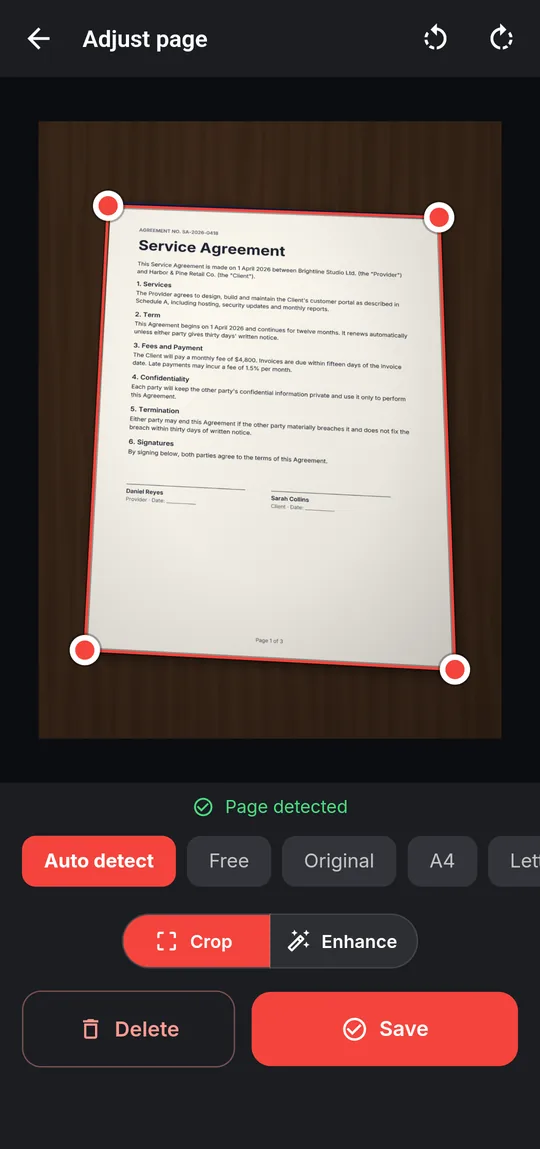
  • Live page detection, with corners you can drag to fine-tune
  • Crop to Auto detect, free, A4, Letter or a custom ratio
  • Filters: Auto, Color, Grayscale, Document, Black & white
  • Multi-page scans: add, retake and reorder, then Create PDF
  • Run Make searchable afterwards to search and copy the text
More about the document scanner
Scan to PDF adjusting the detected corners of a photographed document

Organize

Merge, split and organize pages

Combine the scans, the invoice and the cover letter into one file, pull three pages out of a report, or put a document's pages in the right order — without losing its text, links or bookmarks.

  • Merge PDFs in the order you drag them
  • Split PDF every N pages, page by page or by the ranges you name
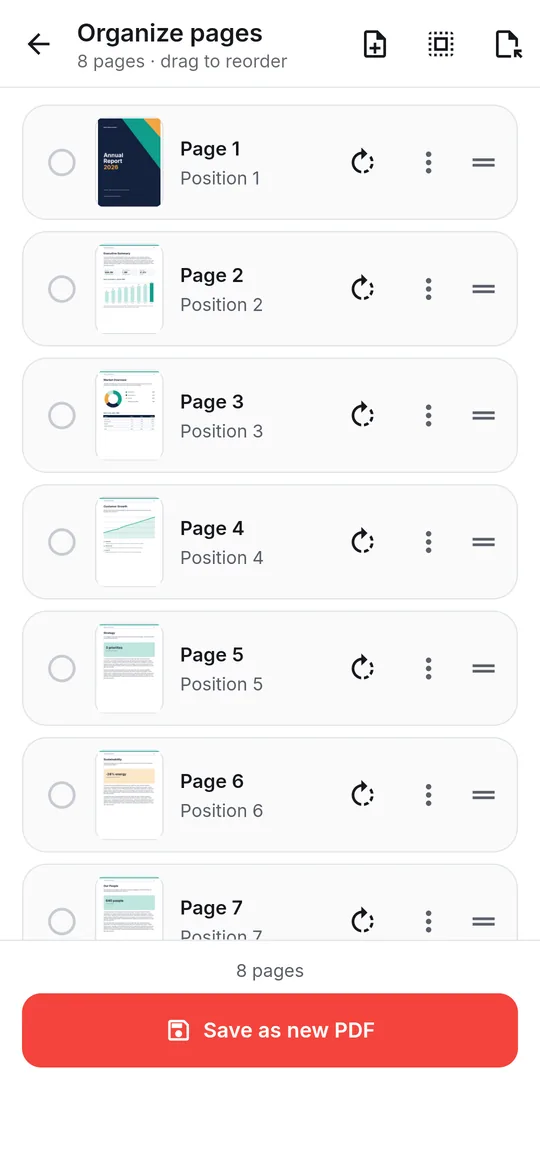
  • Organize pages: reorder, rotate, duplicate, delete, add blank pages, extract
  • Compress PDF re-encodes only the images, so text stays sharp and searchable
  • Merge, split, organize and rotate keep each page as it was: text stays selectable and searchable, and links, bookmarks and form fields keep working.
More about merge, split and compress
Organize pages showing page thumbnails with rotate and reorder controls

Convert

Convert without uploading a thing

Most converters send your file to a website. Here the Word engine, the image pipeline and the text-recognition models are built into the app, so conversion works in flight mode.

  • Word to PDF and PDF to Word (.docx)
  • Image to PDF and PDF to image (PNG or JPEG)
  • PDF to text with on-device OCR, scanned pages included
  • Make searchable adds an invisible text layer to scanned PDFs
  • Text recognition reads English and other Latin-script languages, plus Hindi and Marathi
More about the PDF converter
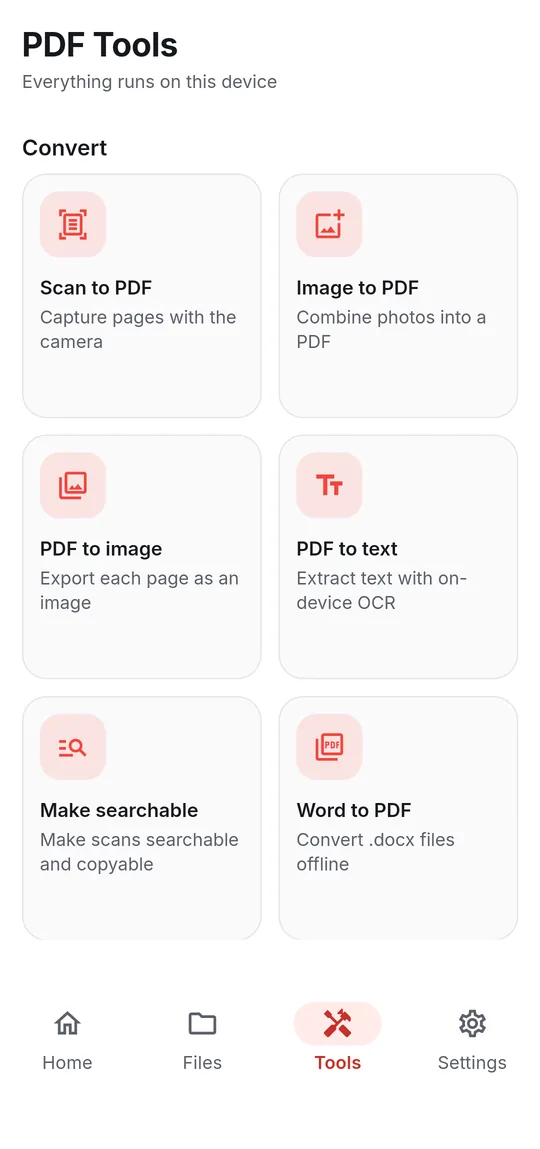
The PDF Tools screen listing Scan to PDF, Image to PDF, PDF to text and Word to PDF

Edit, fill & sign

Edit, fill in and sign PDFs

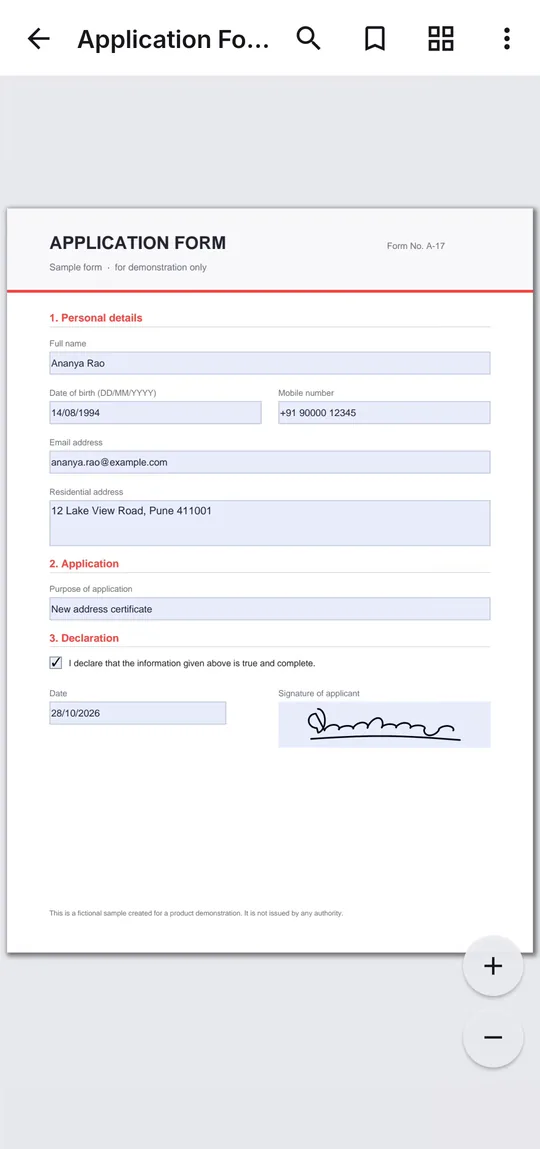
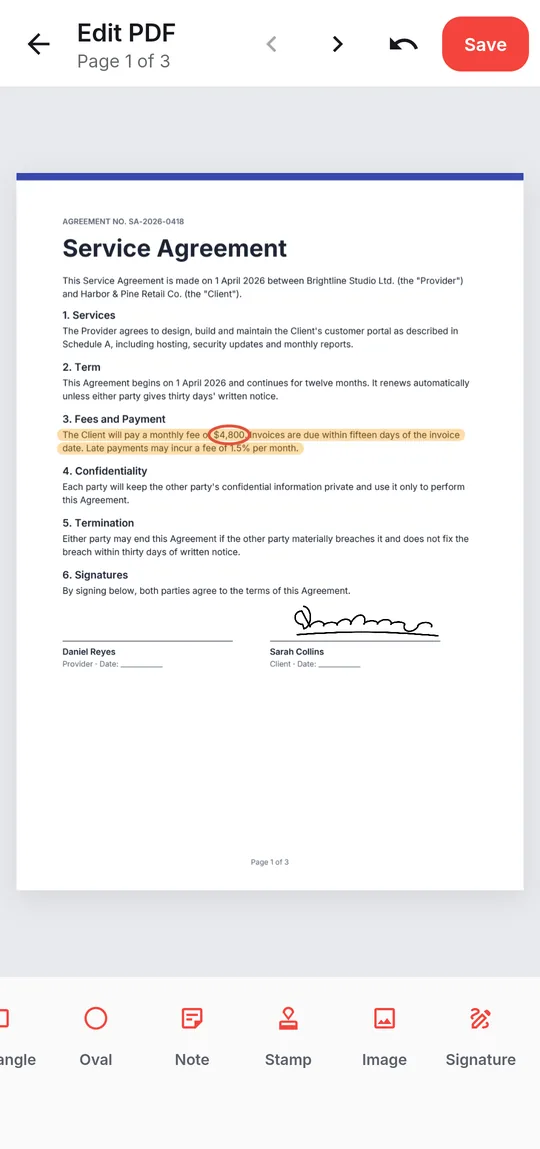
Fill in an application form, add a comment exactly where it belongs, mark up the clause that matters, then sign and send — without printing a page.

  • Text, Highlight, freehand Draw and Erase
  • Line, Arrow, Rectangle, Oval, Note, Stamp and Image
  • Fill form: type into a PDF's own fields, tick boxes, choose options and pick dates
  • Fill & sign any PDF with text, dates, ticks, initials and your saved details
  • Signature: draw, type or photograph it once and reuse it — stored encrypted on the phone
  • Reply to comments, export or import them as XFDF, and add a Summary of comments
  • Everything is saved in a new copy; your original is untouched
More about filling and signing PDFs
An application form filled in on a phone, with typed answers, a ticked declaration, a date and a signature
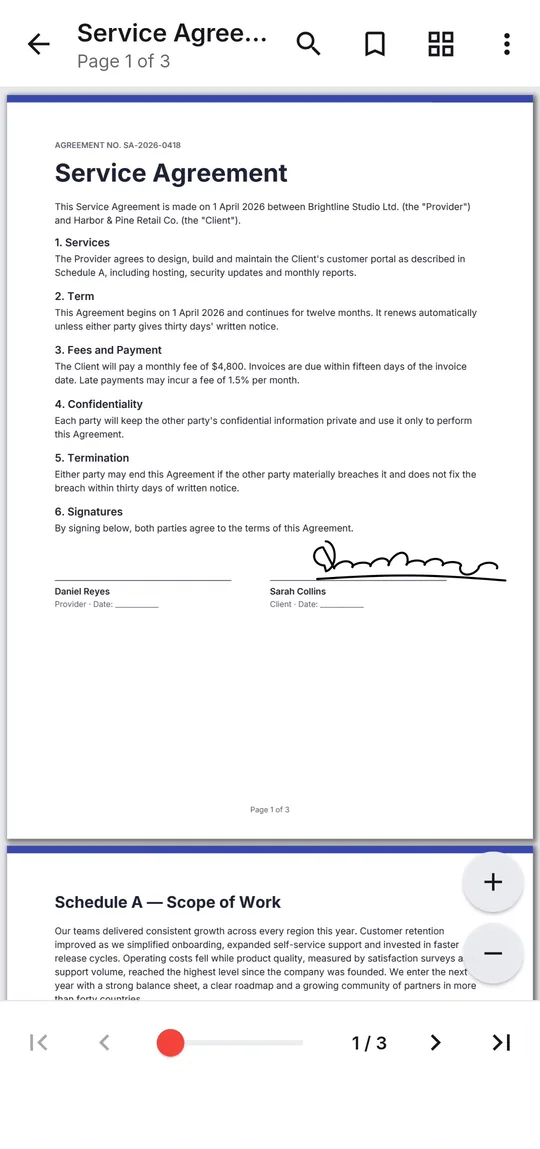
Editing a service agreement with a highlight, a signature and the annotation toolbar

Protect

Keep your PDFs secure

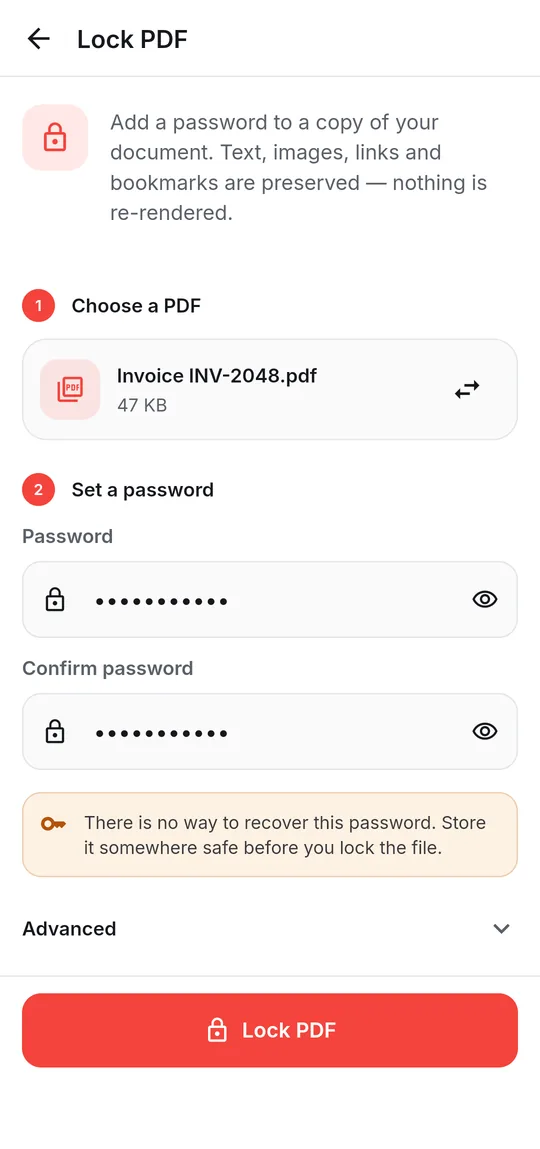
Lock a document before you send it, or save an open copy of one you have the password for. Text, images, links and bookmarks are kept exactly — nothing is re-rendered.

  • Lock PDF with AES-256 (AES-128 for readers older than 2010)
  • Optionally block printing, copying, editing or form filling
  • Unlock PDF when you know the password — it is not a password cracker
  • Passwords you choose to remember stay on the device, in Keystore-backed encrypted storage
More about lock and unlock
Lock PDF screen setting a password on an invoice

Privacy by design

Your documents never leave your phone

The internet connection is used for ads, app settings, crash reports and Google Play updates — never for your files. Read the Privacy Policy.

  • Your documents stay yours

    PDFs are opened, edited and converted on the phone. There is no upload feature and no cloud storage.

  • No account required

    No registration, no email address, and every tool is free. Install the app and use it.

  • Works without a connection

    Every document tool works in flight mode. The connection is used only for ads, settings, crash reports and updates.

Screenshots

Real screens from the app

Captured on an Android phone running the current release.

Worldwide

Made for users around the world

The whole interface is translated into 12 languages. It follows your Android language automatically, and you can switch it any time in Settings. In Arabic the entire layout mirrors right-to-left.

  • English
  • हिन्दीHindi
  • ગુજરાતીGujarati
  • मराठीMarathi
  • தமிழ்Tamil
  • తెలుగుTelugu
  • EspañolSpanish
  • PortuguêsPortuguese
  • FrançaisFrench
  • DeutschGerman
  • Bahasa IndonesiaIndonesian
  • العربيةArabic

Questions

Frequently asked questions

Are my PDF files uploaded to a server?

No. Reading, editing, scanning, OCR, conversion, merging, splitting, compression and password protection all run on your Android device. The app has no upload feature and no cloud storage. Its internet connection is used for advertising, app configuration, crash reports and Google Play updates — never for your documents.

Is PDF Reader free? Does it show ads?

Yes, the app is free and is funded by ads. Banner and full-screen ads appear around the Home, Files and Tools screens, never while a document is open. When some tools finish, the app may ask you to watch a short video before the new file is saved; if you are offline or no video is available, the file is saved anyway. You can also watch three rewarded videos to hide ads for 24 hours. If you prefer no ads at all, an optional Premium subscription, bought through Google Play, turns every ad off. It does not unlock any tool: everything else stays free.

Does it work without an internet connection?

Yes. Every document tool works offline, including Word to PDF, PDF to Word and OCR, because the conversion engines and text-recognition models are built into the app.

Can I fill in PDF forms?

Yes. When a PDF has fillable fields, tap Fill form in the reader: type into text boxes, tick check boxes and radio buttons, choose from drop-down lists, pick dates and sign signature fields. Save it fillable so the answers can still be changed, or flattened so they become part of the page. For a scan or a printed form with no fields, use Fill & sign to type text, dates, ticks and your signature anywhere on the page. Forms built with XFA can't be filled.

Which Android versions are supported?

Android 8.1 (API 27) and later, on phones and tablets. There is no iPhone, Windows or web version.

Where are the files it creates saved?

In the app's PDFReader folder, sorted into sub-folders such as Merged, Split and Converted. Open or share any result from the success sheet. Android deletes this folder if you uninstall the app, so use Save a copy to… to keep a file in any folder, on an SD card or in Google Drive, or share it. Your original documents are never modified.

See all questions

Get PDF Reader on Google Play

Reader, editor, scanner and converter in one free Android app. Android 8.1 or later. Supported by ads. No account needed.

Need help with the app?

Email elixirinfotechindia@gmail.com — we aim to reply within a few business days.

Contact & support